
简介
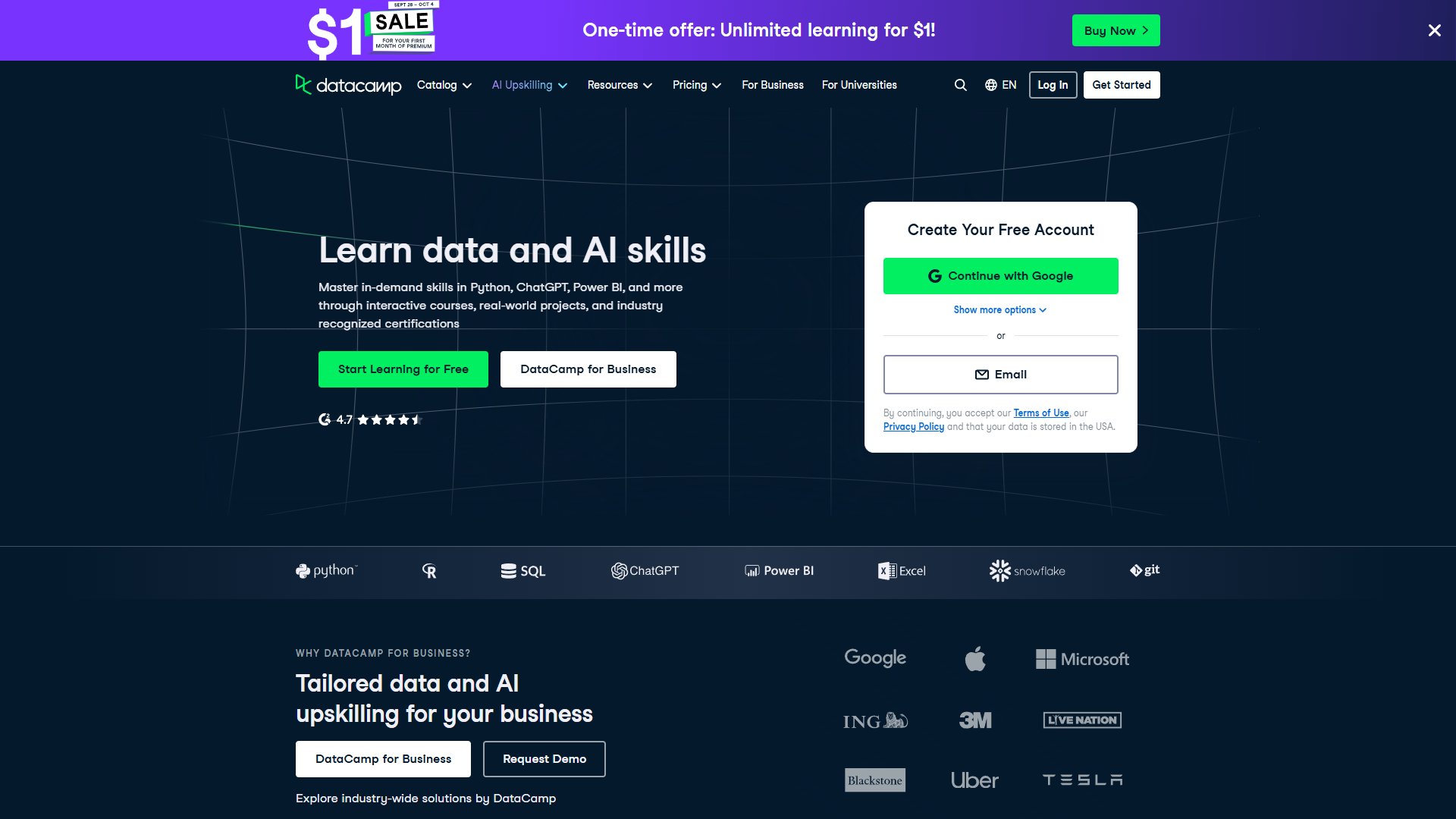
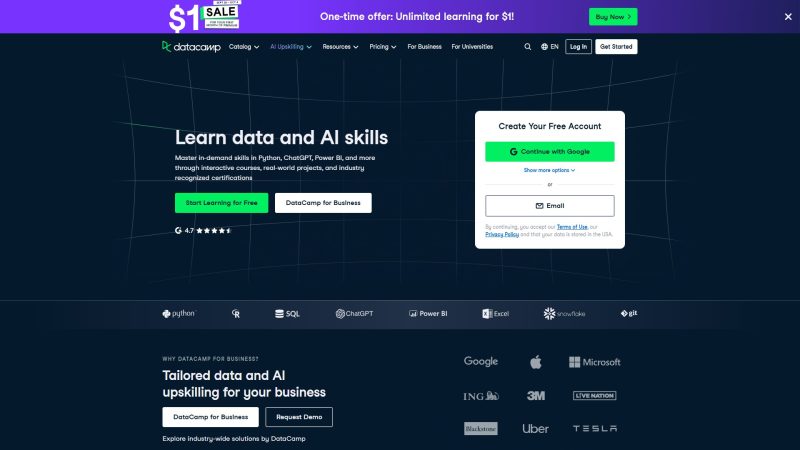
DataCamp 的首页是典型的课程货架:顶部导航排着 Catalog、AI Upskilling、Resources、Pricing、For Business 与 For Universities,右上角是 Log in 与 Get Started。首屏大标题写着 Learn data and AI skills,副标题说明课程覆盖 Python、ChatGPT、Power BI 等方向,靠 interactive courses、real-world projects 与 industry recognized certifications 三件事立住定位,两个按钮分别是 Start Learning for Free 与 DataCamp for Business。往下是一条技术标签带,列着 Python、R、SQL、ChatGPT、Power BI、Excel、Snowflake 与 Git。A path for every goal 区块用 Top Courses、AI、Career Tracks、Skill Tracks 四个页签分流内容,Top Courses 里前几门是 Introduction to Python(4 hr)、Introduction to SQL(2 hr)、Introduction to Power BI(4 hr)、Introduction to AI for Work(2 hr)、Introduction to Tableau(6 hr)与 Introduction to Excel(4 hr),每门都标着 Basic 难度,其中两门带 AI TUTOR 标记。再往下是 A learning model that powers career transformation,把 Hands-on, interactive courses、Become a certified professional 与 Learn from experts 串成一套学习模型;页面还用一整块 Why 20M+ choose DataCamp 放学员评价,底部写着 Join 20M+ learners worldwide,另有 App Store 与 Google Play 的移动端入口。教师方向单独开了 DataCamp Classrooms,标着 1M Teachers and Students、14K+ Schools、180+ Countries 与 6 months of free access for every classroom。企业方向则有 WHY DATACAMP FOR BUSINESS? 区块,列出 Healthcare、Technology、Energy 与 Government 四个行业方案并提供 Request Demo。
✨ 优缺点
- ✅ 免费起步:首页按钮是 Start Learning for Free,注册卡片写着 Create Your Free Account,未订阅也能先上入门课。
- ✅ 交互式练习:官方把学习模型写成 Hands-on, interactive courses——Short videos are broken up by interactive exercises,看完短片就地动手练。
- ✅ 时长难度标注清楚:Top Courses 里每门课直接标出 Basic 难度与 4 hr、2 hr、6 hr 等预计时长,挑课不用猜工作量。
- ✅ AI 陪学:Introduction to AI for Work 与 Introduction to SQL 带 AI TUTOR 标记,首页还单列 Never get stuck with AI,从职业建议到代码解释都有内建 AI 支持。
- ✅ 认证与就业动线:Certifications 一栏列着 AI Fundamentals、Data Analyst、Data Scientist、Data Engineer、AI Engineer、SQL Associate 与 Power BI (PL-300) 等证书,另有 Explore Certification 与简历、面试准备入口。
- ✅ 教师免费额度:DataCamp Classrooms 写着 free for you and your students,覆盖 1M Teachers and Students、14K+ Schools 与 180+ Countries。
- ❌ 方案对比要跳出去看:首页只有 One-time offer: Unlimited learning for $1! 的横幅,Pricing、For Students、Discounts & Promos、Teams Plans 与 Data & AI Unlimited plan 都列在页脚,首页本身给不出完整价目表。
- ❌ 免费与付费内容混排:Top Courses 只标时长与难度,没有单独标出哪些课完全免费,教师免费额度也在另一个 Classrooms 板块里,挑免费课需要自己筛。
📖 使用方法
- 打开首页从 Start Learning for Free 进入注册卡,用 Continue with Google 或 Email 建号;想先看内容就点顶部 Catalog 或 AI Upskilling 进目录。
- 在 A path for every goal 里按目标挑动线:零基础从 Top Courses 的 Introduction to Python(4 hr)、Introduction to SQL(2 hr)起步,进阶走 Career Tracks 或 Skill Tracks。
- 进课后按 Hands-on, interactive courses 的节奏走,短片之间会插入交互练习,在页面里直接写代码并即时看反馈。
- 带 AI TUTOR 标记的课可以随时向内建 AI 提问,卡住时用它做提示或代码解释;按 6 hr 这类时长标注安排每天的学习份额。
- 学完想证明能力就去 Certifications 区挑一个证书备考,如 Data Analyst、SQL Associate、Power BI (PL-300);团队与教师方向分别走 DataCamp for Business 与 DataCamp Classrooms。
💰 收费说明
首页顶部横幅写着 One-time offer: Unlimited learning for $1!,配一个 Buy Now 按钮,是站内唯一直接露价的入口。注册本身免费(Start Learning for Free、Create Your Free Account),教师方向另有明确免费额度——DataCamp Classrooms 写着 free for you and your students,每个课堂送 6 months of free access。完整的订阅方案、学生优惠、Teams Plans 与 Data & AI Unlimited plan 都收在页脚的 PLANS 与 FOR BUSINESS 两栏里,Discounts & Promos 与 Expense DataCamp 也在同一区,要看确切价格需要点进 Pricing 页。
🌐 平台支持
DataCamp 的主体是网页应用,用现代浏览器打开即可学习,课程练习与 DataLab 都在浏览器里跑,桌面与手机浏览器都能用。移动端另有原生 App:页面写着 Unlock skills faster in the DataCamp Mobile app by practicing code, watching videos, and keeping your streak alive!,并给出 Download on the App Store 与 Get it on Google Play 两个入口,方便在桌面与手机之间接着学。教师与企业方向共用同一套网页端后台,分别从 DataCamp Classrooms 与 DataCamp for Business 进入。归类为网站与在线应用。
截图